Features

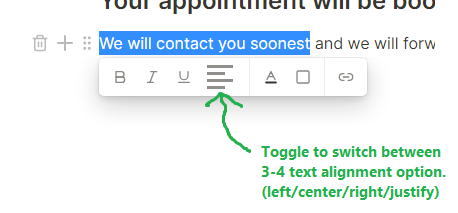
Text Alignment Option

4y agoPending

Formatting option to align specific block to center/right/left(default) as a builtin basic feature.

Use case, generic general use case availability.

block type, may start on the plain text block and heading blocks. I dunno if easily expandable or sensible to implement on other question blocks.

(currently doable only on fiddle advance css code on pro accounts)

  • img/f0hg79su076p5wbndp474p7q
and 63 others

9 comments

  1. Tally merged Setting the text in the middle into this post6mo ago
  2. Filip Minev merged Text formatting into this post9mo ago
  3. Tally11mo ago

    Hi Kelly,

    Thanks for the suggestion — totally makes sense!

    At the moment, text alignment and bulleted lists aren't built into the editor directly, but you can achieve this using custom CSS.

    Here are some guides to help you customize your form:

    https://tally.so/help/customize-your-form

    https://tally.so/help/add-custom-styles

    That said, we understand how useful it would be to have these styling options available right in the editor — so thanks again for the feedback, we’ve noted your suggestion! 🙏

  4. Tally1y ago

    from Text formatting

    Hi Geschäftsstelle München,

    Für den Rest dieser Nachricht benötigen Sie möglicherweise Google Translate oder einen ähnlichen Dienst.

    Thanks for submitting this request!

    I agree that there can be improvements to directly adjusting font sizes for content blocks without the use of Custom CSS.

    As a workaround for now, you can use different the Label, or a Text block to achieve a smaller font size. Right now, you are using a Heading 3 or Title block.

    Keep in mind you can highlight the blocks, and remove the bold from the popup formatter that shows (see screenshot attached).

    Thanks for your patience as we continue to improve, based on your feedback request.

    • img/wnrlqu9ziwer1crzk864p5tl
  5. Tally1y ago

    Hi jihad mimouni,

    Thanks for submitting this request! 🙌🏼

    Indeed, I can see a possible improvement for this type of customizability - aligning the form title more easily within the builder.

    As you mentioned, it is only possible via the Custom CSS feature in the paid plans.

    We look forward to working on this in the future.

  6. Tally1y ago

    from Text formatting

    Hi GGP Holding GGPH, could you please clarify what type of text formatting you are trying to accomplish?

    1. from Text formatting

      Hi Tally, I’m referring to formatting options like font type, font size, and text alignment (e.g., center, justify) similar to what you’d find in Microsoft Word. I have long explanatory text in some forms, and being able to format it properly would make it look much cleaner and easier to read.

    2. Tally1y ago

      from Text formatting

      GGP Holding GGPH: Thank you for the clarification!

      What you’re looking to do is already possible, but it does require Custom CSS, which is a feature available with a Tally Pro subscription. With Custom CSS, you can control styling elements like font size, and text alignment. If you’re interested, you can learn more about how to apply custom styles here: https://tally.so/help/add-custom-styles.

  7. I agree

  8. Yes, I feel like this should be a basic ability, especially in the paid version. Very surprised this isn't present.

  9. I recently requested a full Rich Text Editor, that would solve this and many more formatting requests in one go. Please upvote my request!