
Aug 4
Integration with Microsoft Power Automate
Is it possible to make an integration with Microsoft Power Automate?
Pending
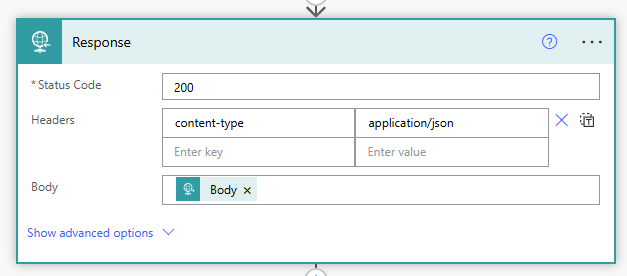
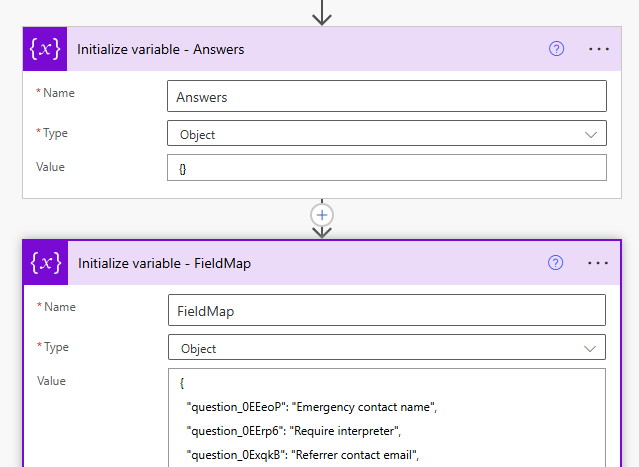
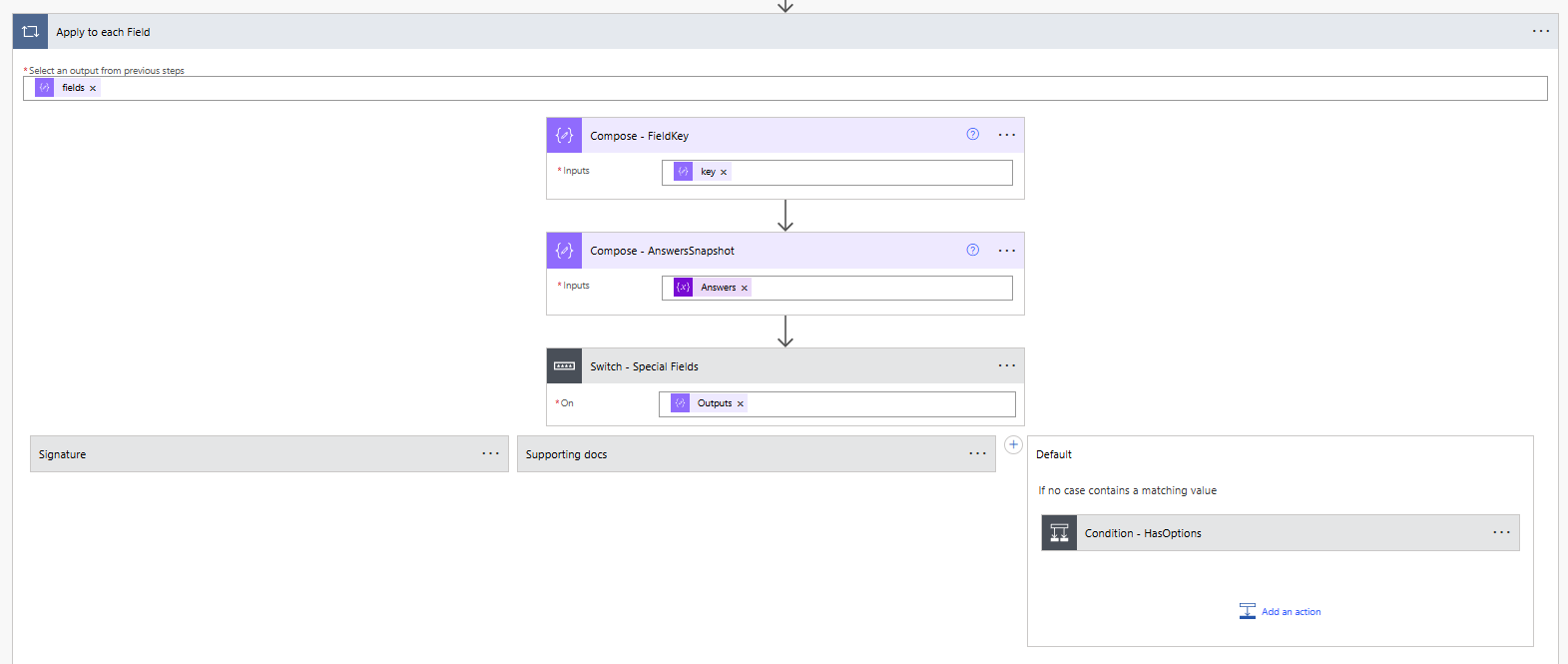
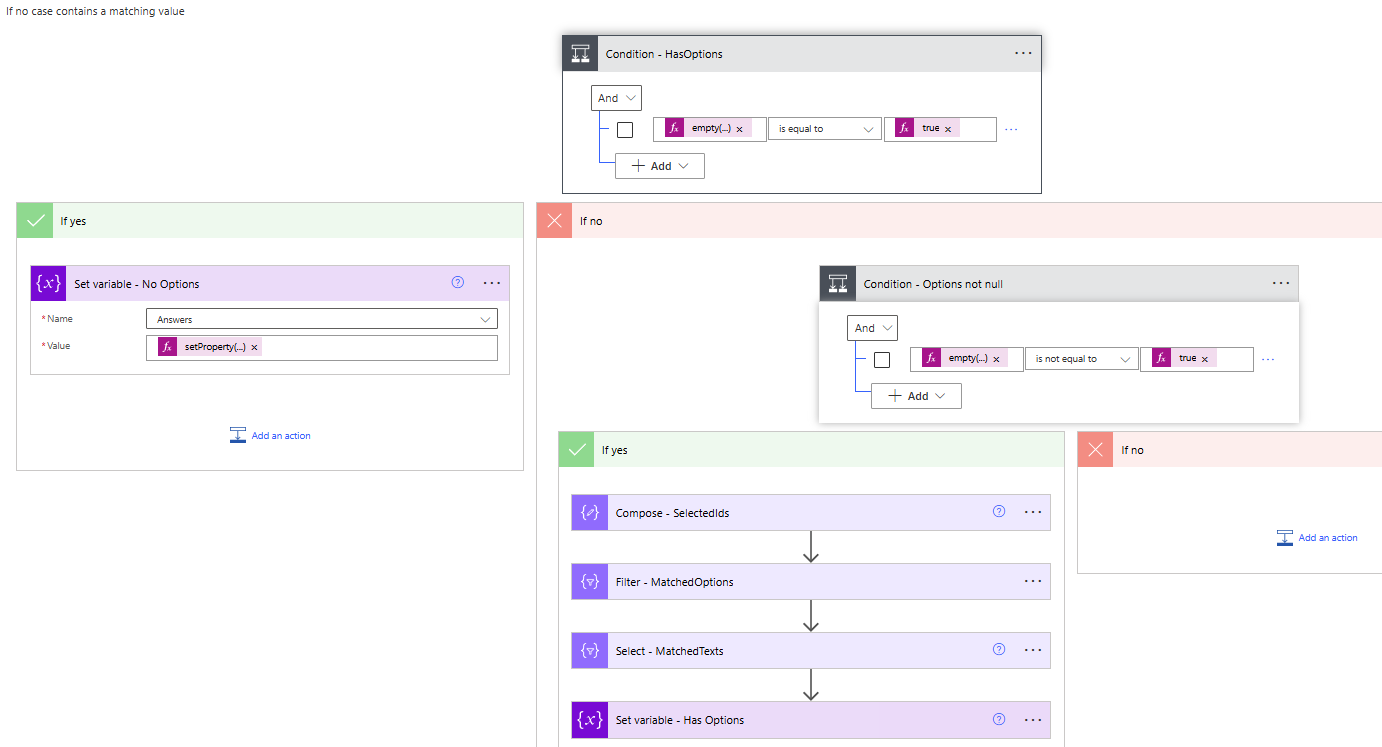
Hi Mark, I thought I would jump in and give you a workaround. All my forms (10+) are integrated into my Power Automate and then to a SP list. You will need a Power Automate Premium licence to achieve and it is not a straight forward method. However, after a lot of trial and error and vibe coding, I have figured out a standard method that I can keep replicating for all the forms I build. ---------------------- 1. Start with creating a new Power Automate flow with when a HTTP request is received and set to anyone can call. 2. Create a response with Status code: 200, Headers: { "content-type": "application/json" } Body will be the body from the webhook. 3. Save and get the POST URL from step 1. In your Tally form, create an integration to webhook with that URL. Send a test response to confirm you are receiving it. 4. The next steps are to parse the webhook and store them. I used to initialise a variable for each question and then use a switch for the key and store the respective value. However, it is too slow and too hard to manage for larger forms. This is when I started vibe coding and got an idea to create two Objects - one for Answers and one for FieldMap with the key and the question display names. 5. Use an Apply to each with the fields and compose to store the key and the answers. 6. Switch will handle 4 cases - Signature field - Attachments - Fields with Options and fields without. Set variable value: @{setProperty( outputs('Compose_-_AnswersSnapshot'), coalesce(variables('FieldMap')?[outputs('Compose_-_FieldKey')], outputs('Compose_-_FieldKey')), if(equals(items('Apply_to_each_Field')?['value'], null), '', string(items('Apply_to_each_Field')?['value'])) ) } I wrapped everything in an empty() function so if it's empty/not mandatory, it will store null, else it will store the value received. For the case with the options, I then get the id of the option and get the matching text. Once you run the flow again, the answers will be stored in the object and you can use coalesce to get the value. Example field I got: @{coalesce(variables('Answers')?['Referral type'], '')} In my case, for each form, I update the Object for the key and the display names and then use a compose after the switch to store all the values. This way, I am using the expressions once and keep referring to the object or compose. Due to data retention policies, after all the data parsing, I send a HTTP to the Tally with my API key as the header to delete the response from Tally. URI: https://api.tally.so/forms/@{triggerBody()?['data']?['formId… Header: Authorization is your API key. ------------------------------ The first time is very daunting and time-consuming but once you set one up, you can replicate and keep making changes. This way, you are not using another service and everything is handled between Tally and Power Automate. If you have any questions, please feel free to reach out and I am more than happy to assist you. Cheers, Shiv
Hi Thomas Deverdenne, Thanks for submitting this request! 🙌🏼 I can see why you'd want that direct native integration based on your outlined use case. There's also a request for the Power Automate here; https://tally.so/feedback/p/integration-with-microsoft-power… As a workaround until we get to this, if you're familiar with code, you can use our webhooks or our API to achieve your use case; https://tally.so/help/webhooks https://tally.so/help/api Feel free to reach out back to us here; with any updates, questions or concerns you may have.
Also from my standpoint it would be a great addition to the automation integrations to have a Power Automate connector. Is this considered to be planned? Thanks